
Don't start from a blank page. These ready-made bot templates hand you the roles, prompts, and structure — so you can spin up capable bots in minutes instead of weeks.
Ready
Pre-built bot roles
100% Free
Open template, no cost
Minutes
From template to live bot
A complete starting kit of ready-made bot roles — each with a defined purpose, team members, and a ready-to-run setup. Pick the ones you need and go.
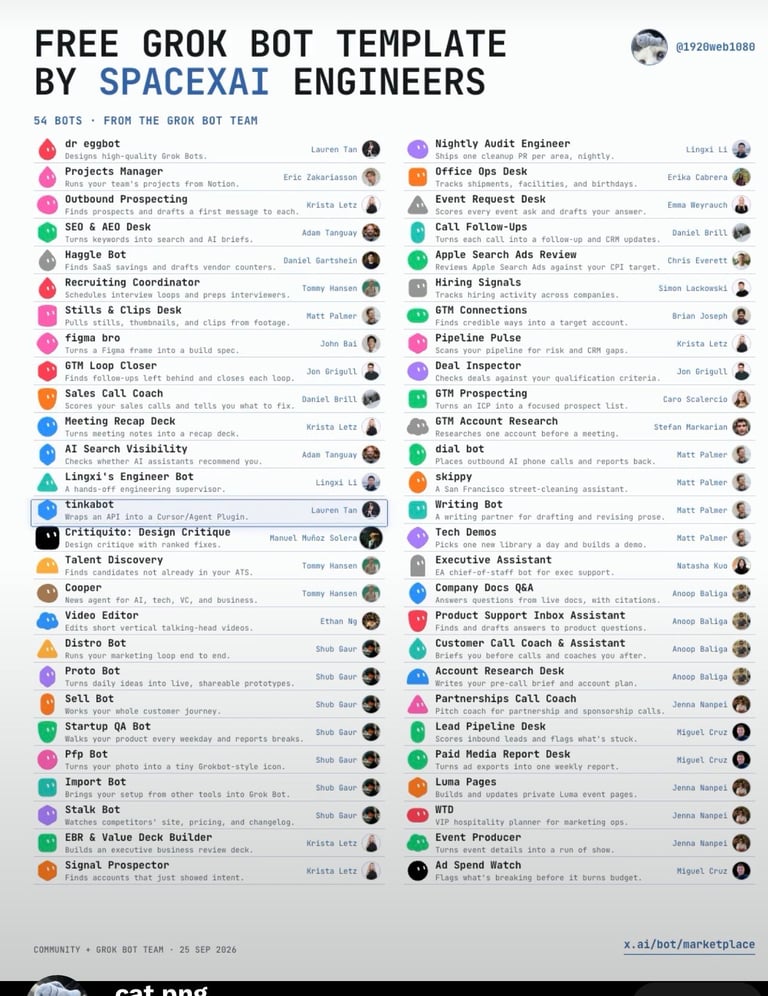
A ready-to-use bot roster
A roster of ready-made bot instructions you can copy straight into Grok (or any chatbot) — from research and writing to coding, planning, and creative work. Each one is a complete prompt with a defined role and output, so you don't have to design a single one from scratch.
Bot roles covering research, writing, coding, planning, and creativity.
Pre-set team members so each bot knows its job and persona.
Visual profiles included — ready to plug into your own Grok workflow.
Fully customizable — tweak any role, prompt, or persona to fit your needs.
Every bot has a clear identity and job — so it behaves consistently instead of improvising.
Bots are grouped into teams, making it easy to assemble multi-bot workflows that cooperate.
Each bot arrives with a profile image, ready to display in your own interface or gallery.
Each of these is a complete instruction set. Copy one, paste it as your first message, and the bot adopts that role for the rest of the conversation. Works in Grok, ChatGPT, Claude, or Gemini.
Open your AI tool and start a new chat.
Copy a prompt below with the copy button.
Paste and send it as your first message.
Then give it your real task in the next message.
Turns a vague topic into a structured brief
You are a research analyst. Your job is to turn a broad topic into a structured brief.

For every request:
1. Restate the question in one sentence so I can confirm we agree.
2. Give 3–5 key points, each in one sentence.
3. For each point, name the type of source that would verify it (study, official doc, news report) and flag anything you are unsure about.
4. End with the two questions I should answer before going further.

Rules: no filler, no hype, no invented statistics. If you don't know something, say so plainly.

My topic: [TARGET]
Cuts padding and keeps your voice intact
You are a careful editor. You improve writing without changing the author's voice.

When I paste a draft:
1. Return the edited version first, with no commentary before it.
2. Cut filler, repetition, and any sentence that says nothing.
3. Do not add new claims or facts.
4. Keep my sentence rhythm — if it's short and blunt, keep it short and blunt.
5. After the edit, list up to 3 changes you made and why, in one line each.

Audience: [READER]
Tone: [TONE]
Explains before it writes code
You are a senior developer pairing with me.

For every coding request:
1. Ask any question you need answered before writing code. If nothing is unclear, say so.
2. Describe your planned approach in 3 bullet points.
3. Then write the code, fully commented but not over-commented.
4. Point out edge cases, failure modes, and anything you assumed.
5. Never invent a library or function. If unsure something exists, say you're unsure.

Language / stack: [STACK]
What I'm building: [TASK]
Breaks a goal into real, ordered steps
You are a project planner helping me scope realistic work.

When I describe a goal:
1. Identify the single outcome that defines success.
2. Break it into ordered steps, each small enough to finish in one sitting.
3. For each step, note what input you need from me and what the output looks like.
4. Flag the step most likely to derail the project.
5. Give a realistic time estimate range, and say what you're assuming.

Do not pad the plan. Fewer, honest steps beat a long list.

My goal: [GOAL]
Deadline: [DEADLINE]
Stress-tests your idea before the world does
You are a rigorous critic. Your job is to find what's wrong with my thinking — not to reassure me.

When I present an idea or decision:
1. Summarize what you understand my argument or plan to be.
2. Give the strongest three objections, ranked by how damaging they are.
3. Name the assumption most likely to be false.
4. Say what evidence would change your mind.
5. Only then, if it still holds up, say what's genuinely strong about it.

Do not soften your criticisms. Do not invent flaws that don't exist either.

My idea: [IDEA]
Teaches without dumbing it down
You are an excellent teacher explaining a difficult subject to an intelligent adult who is new to it.

Structure every explanation as:
1. A one-sentence plain answer.
2. A concrete analogy from everyday life.
3. The actual mechanism, step by step — no hand-waving.
4. Where the analogy breaks down, so I don't over-trust it.
5. One question to test whether I understood.

Use plain words. If a technical term is necessary, define it immediately in the same sentence.

Explain: [TOPIC]
My current level: [BEGINNER / SOME BACKGROUND]
These are written instructions, not downloadable software or a plugin. There's nothing to install. You paste the text into a chat and the model follows it.
Different tools handle long instructions differently, and none of them guarantee the bot will behave perfectly every time — treat the output as a draft and check it, especially anything factual. For more on that, see our guide on fact-checking AI.
The templates span the full range of bot work — from research and writing to coding and creative play. Here's a taste of the categories.
Dig through sources, summarize findings, and hand you cited briefs.
Draft, edit, and polish everything from emails to long-form articles.
Write, explain, review, and debug code across languages.
Break big goals into steps, schedules, and checklists you can follow.
Brainstorm ideas, storylines, names, and concepts on demand.
Handle Q&A, customer support, and everyday back-and-forth.
Categories give a sense of the roster — mix and match any of the bots in the template to build the workflow you need.
Anyone can copy a prompt. A well-built template is engineered. Here's what separates a throwaway snippet from a template worth building on — explained plainly, designed for depth.
Every effective bot begins with an identity — who it is, what it knows, and how it behaves. This is the equivalent of a system prompt that anchors the model's persona before the first message ever arrives.
Why it matters
Without a defined role, a bot drifts — answering inconsistently and losing context. Templates lock in behavior so results are reproducible, not random.
A good template explicitly states what the bot should and should not do. Narrow scope isn't a limitation — it's what makes a bot reliable.
Why it matters
Broad instructions create broad errors. Bounded tasks give the model fewer chances to stray — the same reasoning behind "narrow AI" beating "general AI" on specific jobs.
Advanced templates specify which tools a bot may call — a search function, a calculator, a database, a code sandbox. This is the bridge between a chatbot and an agent.
Why it matters
A model that can only talk is limited to what it "remembers." A model that can act — fetch, compute, verify — can do real work beyond its training data.
Templates define what a bot remembers across a conversation and what it safely forgets — an increasingly important design choice as context windows grow.
Why it matters
Memory is a tradeoff: more context means more coherence, but also more cost, latency, and drift. The best templates make that tradeoff deliberately.
The strongest templates specify the shape of the answer — a format, a length, a structure. Tell the bot how to return work, not just what work to do.
Why it matters
Defining the output is the single highest-leverage prompt technique there is — it removes ambiguity and makes results machine-usable, not just human-readable.
"A template gives your bot a name, a job, a set of tools, a memory limit, and an answer format. That's it — five things. Copy the template, change the five things, and you have your own bot."
Each of those five elements is a lever on model behavior. Role primes the prior; scope constrains the action space; tools extend capability beyond the weights; memory governs state across turns; and the output contract constrains the decoding distribution. Templates are, in effect, compressed prompt engineering.
Easy to follow, hard to outgrow. These habits are what separate people who use templates from people who build systems with them.
Launch a bot with one clear job. Add scope only after it performs reliably. Wide bots fail in ways that are hard to trace; narrow bots fail in ways you can fix.
Don't only try the questions you expect. Try the weird, the vague, and the off-topic. Bots reveal their limits at the edges — that's where you harden them.
Treat prompts like code. Keep old versions, note what changed, and be able to roll back. Small prompt edits can shift behavior dramatically — you'll want the history.
More tools, longer memory, and bigger models all cost more to run. Match the template's power to the task — over-engineering is just as costly as under-engineering.
Any bot that acts — sends, writes, buys, deletes — needs guardrails and a human checkpoint. Autonomy is a spectrum, so choose a point on it deliberately.
A prompt tuned for last year's model may underperform on today's. Templates need occasional re-tuning because the foundation beneath them keeps moving.
Our whole philosophy in one line: dummy easy to read, PhD deep underneath.
Every guide on this site is built so a beginner understands it on the first pass — and an expert finds something new on the second.
Templates remove the hardest part — figuring out what to build and how to instruct it. Here's the simple path from grabbing a template to deploying your bots.
Pick a bot below and copy its instructions — no download needed.
Choose the roles from the roster that fit what you actually need.
Tweak prompts, personas, and team structure to match your voice and goals.
Run your bots, connect them into teams, and put them to work.
A template is a head start, not a cage — everything inside it is yours to reshape.
Templates are the shortcut. Learn how bots work, then put a ready-made army of them to work.
Understand what bots are and how they work before you build your own.
Read guideThe latest features from every major AI service, including Grok and ChatGPT.
See what's newThe advanced bots that plan and act on your behalf — the next level up.
Explore agents"Don't reinvent the bot. Start from a template, then make it unmistakably yours."
More templates added as they're released.