
ChatGPT, Claude, Gemini, Grok, Copilot & more. Discover the tools worth your time—from chatbots to video and image generators. Free options included.
Our comprehensive AI tools directory is 100% free. The ads you see help us research, test, and update our tool reviews.
Advertisement
Google Auto Ads
From Claude to Sora — the most exciting AI tools of 2026 that you need to know about.
Anthropic
A leading AI assistant known for careful reasoning, strong writing, and handling long documents with nuance and depth.
OpenAI
The most widely used general AI assistant. Handles everyday writing, images, and reasoning well—a solid default starting point.
OpenAI
OpenAI's text-to-video model. Describe a scene and generate a short clip—a fast-moving area, so check the latest capabilities on OpenAI's site.
Google's AI assistant, tightly integrated with Gmail, Docs, and Search. A strong pick if your work already lives in Google's ecosystem.
Anysphere
AI-powered code editor that's transformed how developers work. Predicts edits, writes entire features, and debugs in real-time.
Voice AI
Highly realistic AI voices. Clone a voice, generate speech in many languages, and create audiobooks—check the latest language list on their site.
Meta
Meta's AI creative tools for turning ideas into images and interactive experiences—characters and stories you can chat and play with.
xAI
The chatbot from xAI, the AI company behind X (formerly Twitter). Real-time access to X and the live web, with a witty, unfiltered tone.
Microsoft
Microsoft's AI assistant woven into Windows, Office, and Edge. Handles writing, analysis, image creation, and research—right inside the apps you already use.
Whether you need help writing, creating images, analyzing data, or automating tasks—there's an AI tool for that.
Conversational AI that can help with writing, analysis, coding, brainstorming, and more.
OpenAI's flagship chatbot. Excellent for general conversation, writing assistance, coding help, and brainstorming. Powers millions of conversations daily.
Anthropic's AI assistant known for nuanced, thoughtful responses. Great for long documents, analysis, writing, and thoughtful conversations.
Google's AI assistant with deep Google integration. Can access your files, search the web, and work across Google Workspace apps.
New Powered by Gemini 4 Argon, Google's newest frontier model for long-horizon work across coding, finance, legal, and science.
The chatbot from xAI (the AI company behind X, formerly Twitter). Grok has real-time access to X and the live web, with a witty, unfiltered tone and fast answers on current events.
Create stunning artwork, illustrations, and photos from text descriptions—no artistic skills needed.
Industry-leading AI art generator known for stunning, artistic images. Popular with artists, designers, and creative professionals.
OpenAI's image generator integrated with ChatGPT. Excellent at following complex prompts and generating photorealistic images.
Open-source image generator you can run locally or use via cloud. Highly customizable with countless community models.
From blog posts to emails, AI writing assistants help you create content faster and more effectively.
Enterprise-grade AI writing platform with templates for blogs, ads, social media, and more. Great for marketing teams.
AI copywriting tool focused on business content. Great for sales copy, social media, and company communications.
Budget-friendly AI writer with Chatsonic (with web access). Good for articles, product descriptions, and digital ads.
Write better code faster with AI that understands programming languages and can help debug, explain, and generate code.
Microsoft's AI pair programmer integrated into VS Code and other IDEs. Autocompletes code, suggests functions, and helps debug.
AI-first code editor built for pair programming with AI. Chat with your codebase, edit files, and generate entire features.
Browser-based IDE with built-in AI (Ghostwriter). Perfect for learning, prototyping, and collaborative coding projects.
Often called "the GitHub of AI," Hugging Face is one of the world's largest open hubs for machine learning. It's where developers, researchers, and curious beginners come to find, share, and use AI—no PhD required.
huggingface.co · Free to explore
Hugging Face is an open-source platform and community that makes state-of-the-art AI accessible to everyone. Instead of building AI from scratch, you can download ready-made models, try them right in your browser, and use pre-built tools for text, images, audio, and more.
Think of it as a giant, free library of AI—built by a global community and trusted by companies like Google, Microsoft, and Meta. Whether you want to write with an AI assistant, generate images, transcribe audio, or build your own app, Hugging Face gives you the building blocks.
1M+
AI Models
250K+
Datasets
500K+
Spaces (Apps)
Real things beginners can try on day one — all in your browser.
Talk to open-source chatbots and language models — great free alternatives for writing, brainstorming, and Q&A.
Create art from text prompts, remove backgrounds, upscale photos, and try popular models like Stable Diffusion.
Turn audio into text, generate realistic voices, and translate speech across languages in seconds.
Detect sentiment, summarize long articles, classify messages, and pull answers out of documents automatically.
"Spaces" are mini web apps built by the community. Click and use — no install, no setup, no cost.
When you're ready, use simple tools and tutorials to create your own AI-powered project — no server required.
Sign up at huggingface.co — it's free and takes under a minute. No credit card required.
Search for what you want to do — writing, images, audio — and pick a model or app to try.
Type a prompt, upload a file, and watch AI work. Try different models and see what fits your needs.
New to AI tools? Start with our beginner-friendly guides.
Meta AI includes creative tools that turn your descriptions into images and short clips—using simple, everyday language. Some of these creative features have carried the name Muze. Feature names and availability change often, so confirm the latest at meta.ai.
Meta AI creative tools · Web & app
Muze refers to Meta's AI-powered creative tools. Instead of jumping between different apps and tools, you describe what you want in plain English and it helps you generate it—images, short videos, and guided creative projects.
Part of the Meta AI ecosystem, these tools are aimed at creators, marketers, and complete beginners alike. They lower the barrier to making polished visuals—no design team, fancy software, or editing skills required.
Text
to Image
Text
to Video
Meta
AI Powered
Creative tasks beginners can jump into right away.
Turn a sentence into artwork, product mockups, or social graphics in seconds.
Describe a scene and get a short video clip—great for reels, ads, and storytelling.
Change the look, style, or mood of existing visuals with simple AI prompts.
Quickly create on-brand visuals for posts, campaigns, and small business marketing.
Chat through ideas with Meta AI, then bring the best ones to life in Muze.
Access Muze and Meta AI on the web and across Meta's apps—create on the go.
Visit Meta AI on the web or in a Meta app and find the creative / Muze experience.
Type a simple prompt—what you want to see, the style, and the mood. Plain English is all you need.
Review the results, tweak your prompt, and keep iterating until it's just right.
Want to compare creative AI tools? Explore our full image and video tool guides.
The AI assistant from xAI—the company behind X (formerly Twitter). Grok is built for real-time answers, live information, and a refreshingly unfiltered style.
Free AI assistant · Web & app
Grok is the chatbot built by xAI, the AI company founded by Elon Musk and behind the X platform (formerly Twitter). It answers questions in plain language, writes, analyzes, and even generates images—all with a noticeably witty, less-restricted personality than many competitors.
What really sets Grok apart is live access to current information. Because it's tied into X and the live web, Grok can speak to what's happening right now—not just what it learned during training. It's available to try for free, with paid tiers for heavier use.
Live
Web & X Access
Real
Time Answers
Free
Tier Available
Practical, everyday tasks beginners can jump into right away.
Ask about breaking news or trending topics and get answers grounded in what's happening now.
Dig into a topic, summarize sources, and compare options—with live web results pulled in.
Draft emails, posts, and articles—then adjust the tone, length, or style in seconds.
Turn a description into artwork, mockups, or social graphics with Grok's built-in image tools.
Explain code, debug errors, or generate snippets—handy for beginners and pros alike.
Brainstorm, joke around, or explore ideas with a chatbot that feels less stiff than the rest.
Head to x.ai (or the Grok app) and start a free chat—no technical setup required.
Type a question or task in plain English. Enable web/X access when you want current info.
Follow up to sharpen answers, or ask Grok to generate images and analyze data.
Want to compare chatbots before choosing? Explore our full chatbot guide.
Microsoft's AI assistant, woven directly into Windows, Office, and Edge—bringing writing, analysis, images, and research into the apps you already use every day.
Microsoft · Free tier & paid plans
Microsoft Copilot is an AI assistant built on the company's most advanced models. Instead of being a single app you have to remember to open, Copilot lives inside the tools you're already working in—Word, Excel, PowerPoint, Outlook, Teams, Edge, and Windows itself.
That integration is its real superpower. You can draft a document in Word, analyze a spreadsheet in Excel, summarize a long email thread in Outlook, or research a topic in Edge—without ever leaving the app. There's also a free, standalone Copilot on the web and mobile, plus powerful (paid) tiers that unlock deeper integration and more capability.
In-App
Office & Windows
Images
& Research
Free
Tier Available
Practical, everyday tasks—straight from the apps you use.
Generate reports, letters, and proposals in Word—then refine the tone and length in a click.
Ask Excel questions in plain English to spot trends, build formulas, and create charts.
Condense long email threads in Outlook and draft polished replies in seconds.
Turn a description into visuals for slides, posts, or mockups with built-in image generation.
Turn a document or prompt into a full PowerPoint deck—complete with speaker notes.
Get summarized answers with sources right inside Edge as you browse the web.
Visit copilot.microsoft.com, or use the Copilot button already in Windows, Edge, and Office.
Type what you want—"summarize this," "draft an email," or "make a chart from this data."
Tweak the output, ask follow-ups, and drop it straight into your document, sheet, or slide.
Want to compare assistants before choosing? Explore our full chatbot guide.
New to AI? Here's how to start using these tools safely and effectively.
Try free versions first. ChatGPT, Claude, and Gemini all have free tiers with generous limits.
The better your prompts, the better results. Include context, format preferences, and examples.
AI can make mistakes. Always fact-check important information before using it.
Don't give up if first results aren't perfect. Refine your approach and learn what works.
Anyone can browse a list. Here's how to actually judge an AI tool — the questions that separate informed selection from hype-chasing.
Try the free tier, check if your data is safe, and ignore boastful benchmark claims. Judge tools by your own experience.
Distinguish the model from the scaffold, price along tokens/compute/generations, verify training and retention terms, and discount contaminated benchmarks in favor of your own eval set.
Here's a real model-comparison chart — the kind you'll see everywhere. We'll read it together, using it to see exactly how benchmark tables help and exactly where they mislead.
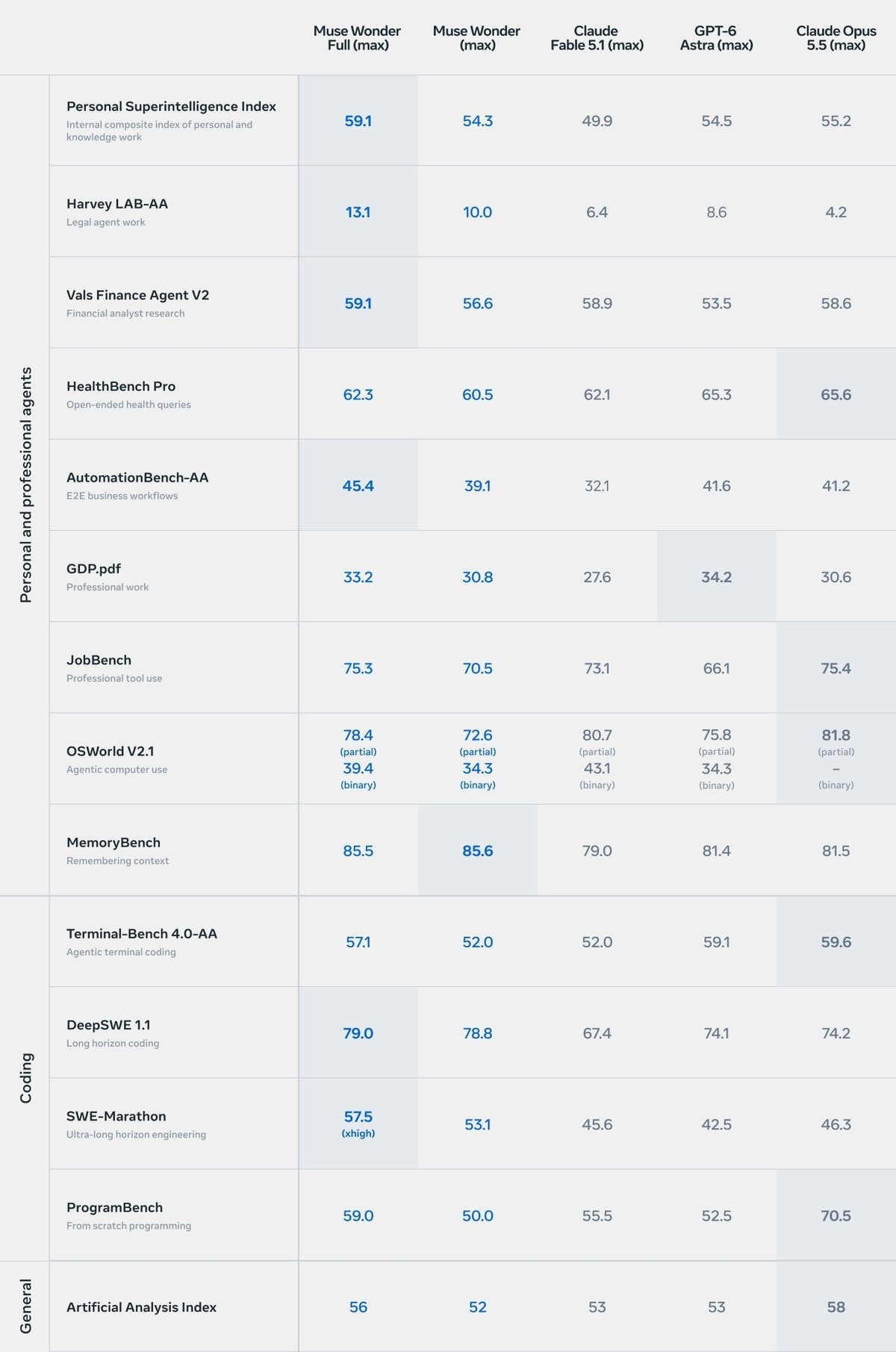
A benchmark table is a report card across subjects. Don't just grab the top score — find the row that matches what you need, then try the best two or three yourself.
Read the matrix as conditional strengths, respect the noise floor, watch for contamination and saturation, and use public benchmarks only to shortlist candidates — your private eval set makes the final call.
Start with our favorites—all free to try. No credit card needed. Pick a tool and see what AI can do for you.
Looking for tutorials? Check our guides to get started with each tool.